Contract/PDF Redline Diff Viewer
Compare two PDF, text or Word documents and see a redline of every change · free, no signup
See Contract/PDF Redline Diff Viewer in action
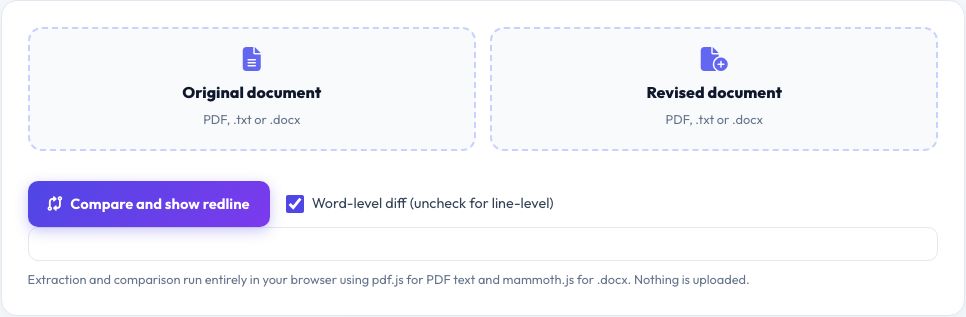
PDF and Document Redline Diff Viewer — Compare Two Versions Instantly
When a contract, policy or report goes through several drafts, finding exactly what changed between two versions by eye is slow and risky — a single deleted clause or changed number is easy to miss. This tool takes two documents, the original and the revised version, extracts their text and shows a redline: every word that was added appears highlighted in green, and every word that was removed appears struck through in red, exactly like the markup a lawyer or editor would produce by hand.
It accepts PDF, plain text (.txt) and Word (.docx) files in any combination — extracting PDF text with pdf.js and .docx text with mammoth.js, the same libraries already used elsewhere on this site. The comparison itself runs a word-level (or, if you prefer, line-level) diff algorithm entirely in your browser, so contracts and sensitive documents never leave your device. A summary shows how many words were added, how many were removed, and an overall similarity percentage, so you can gauge at a glance how heavily a document was revised before reading the detail.
Key features
PDF, DOCX and TXT support
Extracts text locally with pdf.js and mammoth.js.
Word-level or line-level diff
Switch modes depending on how granular you need the comparison.
Clear redline styling
Green additions, red strikethrough deletions — familiar to anyone who has reviewed tracked changes.
Change summary
Words added, words removed and an overall similarity score.
How to use it
- Upload or drop the original document on the left.
- Upload or drop the revised document on the right.
- Click Compare and show redline.
- Review the green additions and red deletions, and check the similarity score.
Worked example
Example
Clause 4.2 changes from “the deposit is refundable within 30 days” to “the deposit is non-refundable” → the redline shows “refundable” struck through in red and “non-refundable” inserted in green, so the change is impossible to miss.
Who uses this tool
Lawyers and paralegals
Spot every change between contract drafts without reading both versions side by side.
Procurement and compliance teams
Compare policy or terms-of-service revisions quickly.
Writers and editors
Review what changed between drafts of a report or manuscript.
Tips for the best results
- Use word-level diff for contracts and precise wording; switch to line-level for restructured documents where whole paragraphs moved.
- Check the similarity percentage first — a very low score usually means the documents are different files entirely, not just revised.
- For scanned (image-only) PDFs, text extraction will return little or nothing — use a text-based or OCR'd PDF instead.
- Keep both original files handy in case you need to double-check formatting the plain-text diff cannot show.
Common mistakes to avoid
- Comparing a scanned image PDF, which has no extractable text layer.
- Assuming the diff shows formatting changes — it compares the words only, not fonts, styles or layout.
- Reading only the summary numbers without checking the actual redline for context around each change.
Why use AZRS QuickFix?
It is 100% free, needs no signup and has no watermark or usage limits. The tool runs in your browser, so what you type stays on your device, and it works on phones, tablets and desktops. New tools are added every week — bookmark this page or browse the full QuickFix toolbox.
Frequently asked questions
Does this tool store or upload my documents?
No. Text extraction and comparison both happen in your browser using pdf.js and mammoth.js; your files are never sent to a server.
Can it compare a PDF to a Word document?
Yes — you can mix formats freely; each file's text is extracted independently before comparing.
Why does a scanned PDF show no differences or empty text?
Scanned PDFs are images with no embedded text layer, so pdf.js cannot extract words from them. Use an OCR tool first, or compare the text-based source files instead.
What is the similarity percentage?
The share of matched words in the diff versus the total words compared — a rough indicator of how much changed, not a legal measure of similarity.
Is there a size limit?
Very long documents (tens of thousands of words) automatically switch to a faster block-comparison mode to stay responsive; for typical contracts and reports the full word-level diff runs in seconds.
Can I export the redline?
You can select and copy the highlighted result from the page, or print it to PDF using your browser's print dialog.