Text Cleaner
Remove extra spaces, blank lines and formatting junk · free, no signup
See Text Cleaner in action
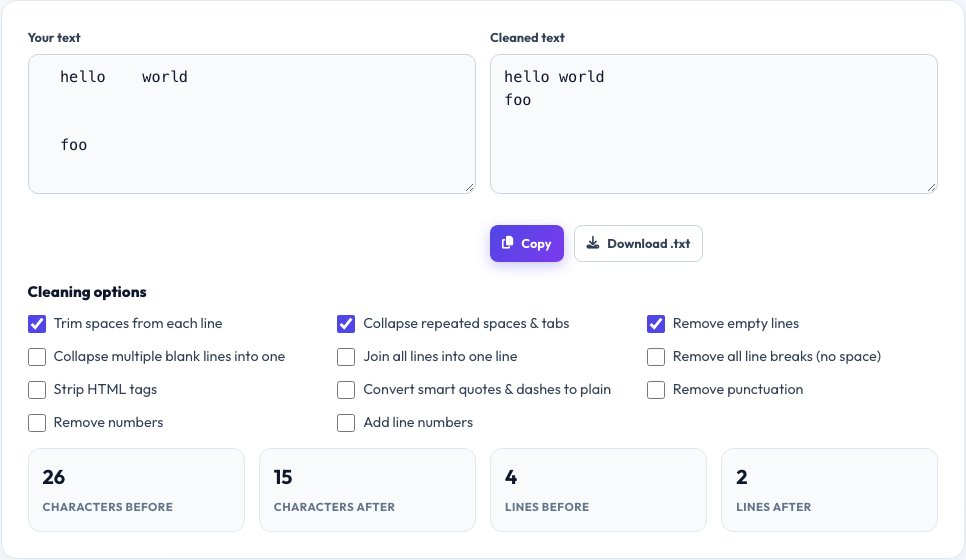
Free Text Cleaner — Remove Extra Spaces, Blank Lines and Line Breaks
Text copied from PDFs, emails, websites and chat apps is often full of double spaces, stray line breaks, empty lines and hidden formatting. This text cleaner fixes all of it with a few tick boxes: trim each line, collapse repeated spaces, remove empty lines, join everything into a single line, strip HTML tags, convert smart quotes to plain ones and more.
The output updates live as you toggle options, and you can copy it or download it as a text file. It is ideal for cleaning data before import, preparing copy for a CMS, fixing text from PDFs and getting emails ready to paste elsewhere — all without leaving your browser.
Key features
Live cleaning
See the result update as you tick options.
Ten cleaning options
Spaces, tabs, blank lines, line breaks, HTML tags, quotes, numbering and more.
Before and after
Character and line counts show what was removed.
Copy or download
Take the cleaned text away as a file or clipboard copy.
How to use it
- Paste your messy text.
- Tick the cleaning options you need.
- Check the live result and the before/after counts.
- Copy or download the cleaned text.
Worked example
Example
Input:   "  hello    world  \n\n\n  foo  "
Options: trim lines + collapse spaces + remove empty lines
Output:  "hello world\nfoo"
Who uses this tool
Content editors
Clean text pasted from PDFs and Word before publishing.
Data workers
Tidy lists and exports before importing them.
Everyone
Fix broken line breaks in copied emails and web text.
Tips for the best results
- Use “join lines” for text copied from PDFs with hard line breaks.
- Remove empty lines before sorting or de-duplicating a list.
- Strip HTML tags when pasting from a web page editor.
- Keep the original in another tab in case you over-clean.
Common mistakes to avoid
- Removing all line breaks from text where paragraphs matter.
- Stripping tags from code you meant to keep.
- Forgetting to re-check special characters after converting quotes.
Why use AZRS QuickFix?
It is 100% free, needs no signup and has no watermark or usage limits. The tool runs in your browser, so what you type stays on your device, and it works on phones, tablets and desktops. New tools are added every week — bookmark this page or browse the full QuickFix toolbox.
Frequently asked questions
How do I remove extra spaces from text?
Tick “collapse repeated spaces” and “trim each line”.
How do I remove empty lines?
Tick “remove empty lines”. Blank lines disappear instantly.
Can it strip HTML tags?
Yes. Tick “strip HTML tags” to leave only the text.
Will it change my original text?
No. Your input box stays as it is and the cleaned result appears separately.
Is there a size limit?
No fixed limit; very large text may take a moment on slower devices.
Is my text uploaded?
No. Everything is processed locally in your browser.