STL to 2D Drawing — Top, Front & Side Views to SVG / DXF
Turn a 3D model into a third-angle three-view outline sheet with overall dimensions, as SVG or DXF · free, no signup
See STL to 2D Drawing — Top, Front & Side Views to SVG / DXF in action
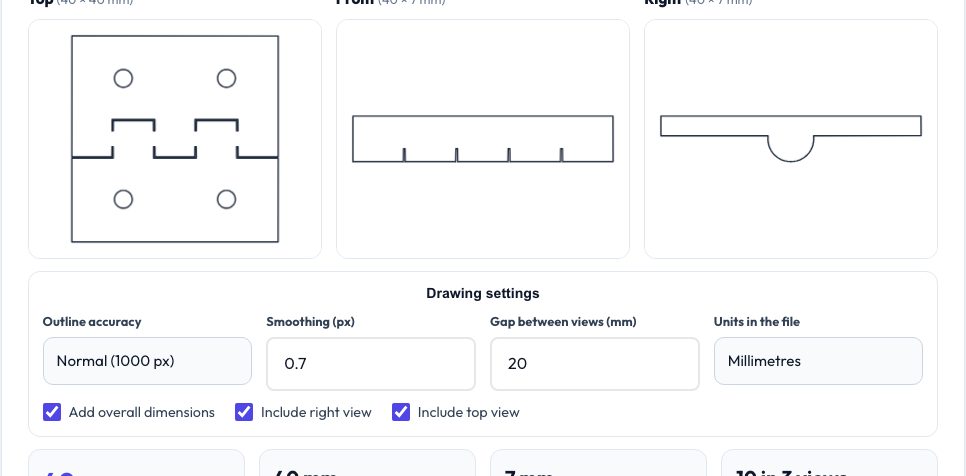
Free STL to 2D Drawing — Top, Front and Side Views
Sometimes you only need the outline of a 3D part: a template for a laser-cut base, a cut-out for a fixture, or a quick three-view for documentation. This tool projects the model onto the top, front and right planes, traces the silhouette (holes included) and lays the three views out in third-angle projection with the overall width, depth and height.
The outline is accurate to one pixel of the chosen resolution, so a 100 mm part at 1000 px is within ±0.1 mm. Export the full sheet or any of the six views as DXF or SVG. Everything runs in your browser and the file is never uploaded.
Key features
Third-angle sheet
Front, top and right views positioned correctly with spacing you set.
Holes preserved
Through-holes and notches appear as inner outlines.
Overall dimensions
Width, height and depth added as dimension lines.
Six single views
Top, front, right, left, back and bottom.
How to use it
- Drop in the model.
- Set the accuracy, view gap and units.
- Review the three views.
- Download the sheet or a single view as DXF or SVG.
Worked example
Example
A 40 × 25 × 20 mm block with a 6 mm hole through the top produces a front view of 40 × 20 mm, a top view of 40 × 25 mm with a circular inner outline and a right view of 25 × 20 mm.
Who uses this tool
Laser-cut makers
Templates and bases from 3D parts.
Machinists
Outlines for fixtures and soft jaws.
Documentation
Quick three-view drawings.
Students
Check projection exercises.
Tips for the best results
- Use Fine accuracy for small parts.
- Orient the model so Z is up before exporting.
- Add kerf with the offset tool before cutting.
- Check units — inch files need the inch setting.
Common mistakes to avoid
- Expecting hidden lines: only the outer silhouette and through-holes are drawn.
- Using it as a tolerance drawing.
- Forgetting to rotate models that were exported lying on their side.
Why use AZRS QuickFix?
It is 100% free, needs no signup and has no watermark or usage limits. The tool runs in your browser, so what you type stays on your device, and it works on phones, tablets and desktops. New tools are added every week — bookmark this page or browse the full QuickFix toolbox.
Frequently asked questions
Is it first or third angle?
Third-angle layout, matching US and many Asian standards.
Does it include dimensions?
Overall width, height and depth only.
Can I use it in CAD?
Yes, import the DXF.
Is it free?
Yes and nothing is uploaded.