Random Team & Group Generator
Split a list of names into random, balanced teams or groups · free, no signup
See Random Team & Group Generator in action
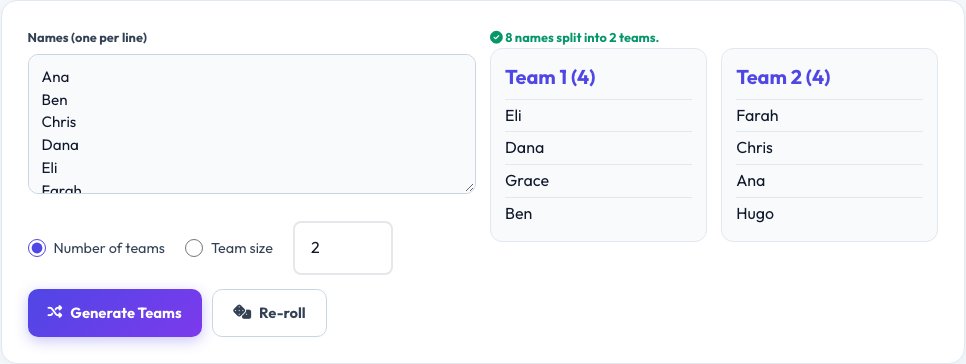
Free Random Team & Group Generator
"Just pick teams" is a common source of arguments and hurt feelings, whether it's a school sport, an office trivia night or a game with friends — someone always suspects the captain stacked the deck. This tool removes that entirely: paste in a list of names, one per line, choose either the number of teams you want or the size of each team, and it shuffles everyone using a genuinely random draw and lays out the resulting groups instantly.
Every shuffle uses a fresh random order, so re-rolling gives a different split each time, which is useful for running several rounds of mixed groups in one session (like rotating small-group discussions or gym stations) without ever repeating the same combination twice in a row.
Key features
Split by team count or team size
Choose whichever constraint matters for your situation.
Genuinely random shuffle
Uses a proper random draw, not a predictable pattern.
Re-roll instantly
Get a fresh, different split with one click.
Handles uneven numbers
Distributes any remainder as evenly as possible across teams.
How to use it
- Paste your list of names, one per line.
- Choose to split by number of teams or by team size.
- Click Generate Teams.
- Re-roll for a new random split if needed.
Worked example
Example
8 names, split into 2 teams → Team 1: Ana, Ben, Chris, Dana. Team 2: Eli, Farah, Grace, Hugo — re-rolling produces a different, equally random split.
Who uses this tool
PE teachers and coaches
Split a class or squad into fair teams instantly.
Office managers and event organisers
Randomise groups for trivia nights, icebreakers or workshops.
Game nights with friends
Settle team picks without an argument.
Tips for the best results
- Use team size (not team count) when you need exactly N players per team regardless of how many teams that creates.
- Re-roll a few times if you want to eyeball for reasonable balance before locking in the teams.
- For skill-balanced teams rather than pure random, seed each team with one strong player manually first, then randomise the rest.
- Keep the name list handy to re-run for a second activity without retyping it.
Common mistakes to avoid
- Assuming a random split guarantees skill balance — it only guarantees fairness of process, not equal ability across teams.
- Re-rolling repeatedly until a particular desired outcome appears, which defeats the purpose of a random draw.
- Forgetting to remove someone who left, leading to an extra "ghost" name in a team.
Why use AZRS QuickFix?
It is 100% free, needs no signup and has no watermark or usage limits. The tool runs in your browser, so what you type stays on your device, and it works on phones, tablets and desktops. New tools are added every week — bookmark this page or browse the full QuickFix toolbox.
Frequently asked questions
Is the shuffle actually random, or predictable?
It uses a proper random shuffle algorithm (Fisher-Yates) seeded by your browser's random number generator, so every re-roll produces a genuinely independent, unpredictable split.
What happens if the names don't divide evenly into teams?
The remainder is distributed as evenly as possible, so teams differ in size by at most one person.
Can I split by team size instead of team count?
Yes, switch the mode to team size and it works out how many teams that creates instead.
Is my list of names stored anywhere?
No, it's processed entirely in your browser for that session and not saved or uploaded.
Can I use this for more than two teams?
Yes, there's no limit on the number of teams; set any number appropriate for your group size.
Does it avoid putting the same people together on repeated re-rolls?
No, each re-roll is fully independent and random, so the same pairing can occur again by chance, especially with small groups.