Mouse Tester & Polling Rate Test
Test every button, the wheel, double-click faults and your mouse polling rate · free, no signup
See Mouse Tester & Polling Rate Test in action
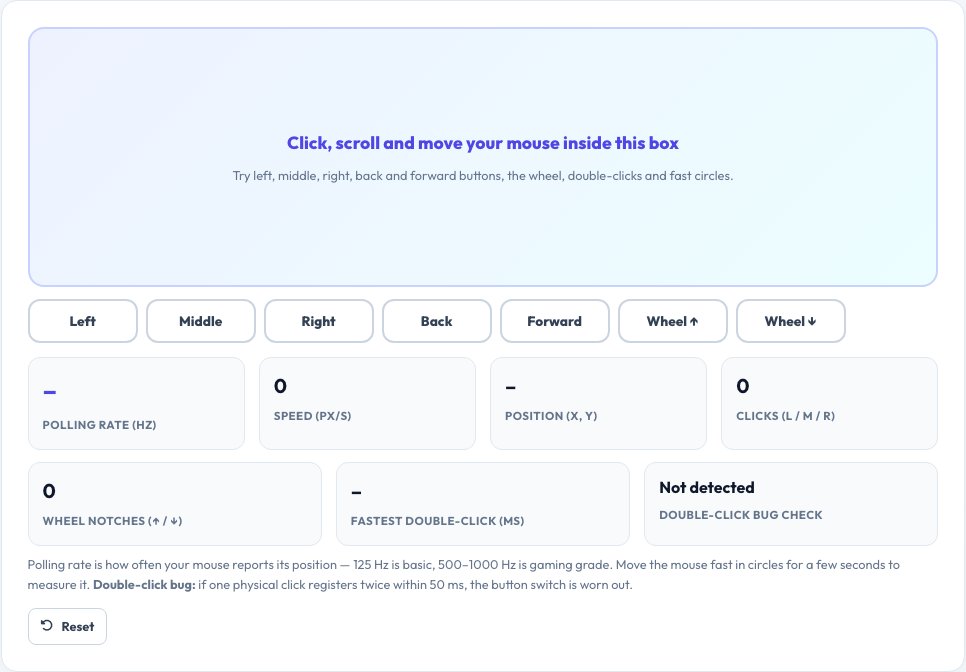
Free Online Mouse Tester — Buttons, Scroll Wheel, Double-Click Bug and Polling Rate
Click, scroll and move inside the test box and each part of your mouse lights up as it is detected: left, middle, right, and the back and forward side buttons, plus wheel notches up and down. It counts clicks, shows your pointer position and speed, and helps you spot a worn or faulty mouse.
Two diagnostics set it apart. The double-click bug check flags a single physical click that registers twice within 50 milliseconds, the classic symptom of a worn micro-switch. The polling-rate test measures how often your mouse reports its position — 125 Hz for basic mice, 500 to 1000 Hz for gaming mice — from the time between movement events while you move the mouse quickly.
Key features
All buttons and wheel
Left, middle, right, back, forward and wheel up/down.
Double-click fault check
Detects switches that fire twice.
Polling rate
Estimates 125, 250, 500 or 1000 Hz.
Speed and position
Live pointer speed in pixels per second.
How to use it
- Move the pointer into the test box.
- Press each button and scroll up and down.
- Move the mouse quickly in circles for 3–5 seconds to measure polling rate.
- Watch for any double-click warnings.
Worked example
Example
Polling rate ~1000 Hz · fastest double-click 84 ms · no double-click bug → a healthy gaming mouse.
Who uses this tool
Gamers
Verify polling rate and find a failing button.
Buyers and returners
Check every button on a new or used mouse.
Office and IT support
Diagnose a mouse that double-clicks or scrolls wrongly.
Tips for the best results
- Plug wired mice straight into the computer, not a hub.
- Move fast and in circles for a stable polling-rate reading.
- Clean the wheel and sensor if scrolling or tracking is jumpy.
- Set your mouse software to its highest polling rate for gaming.
Common mistakes to avoid
- Measuring polling rate with slow movements.
- Blaming the mouse when a driver or button remap is at fault.
- Testing a wireless mouse with a nearly flat battery.
Why use AZRS QuickFix?
It is 100% free, needs no signup and has no watermark or usage limits. The tool runs in your browser, so what you type stays on your device, and it works on phones, tablets and desktops. New tools are added every week — bookmark this page or browse the full QuickFix toolbox.
Frequently asked questions
What is mouse polling rate?
How many times per second the mouse reports its position. 125 Hz = every 8 ms, 1000 Hz = every 1 ms.
What is the double-click bug?
A worn switch registers one press as two clicks, causing accidental double-clicks and broken drags.
Why is my measured rate lower than advertised?
The browser merges events, and the rate depends on movement speed and your operating system. Move fast, and use a wired connection.
Do the side buttons work?
Yes, back and forward buttons are detected when your mouse has them.
Can I test a trackpad?
Yes, though trackpads have no side buttons and different polling.
Is anything stored?
No, results stay in your browser.