CSV to SQL INSERT Generator
Convert a real CSV file into real SQL INSERT statements, with automatic column type detection, ready to run · free, no signup
How CSV to SQL INSERT Generator works, step by step
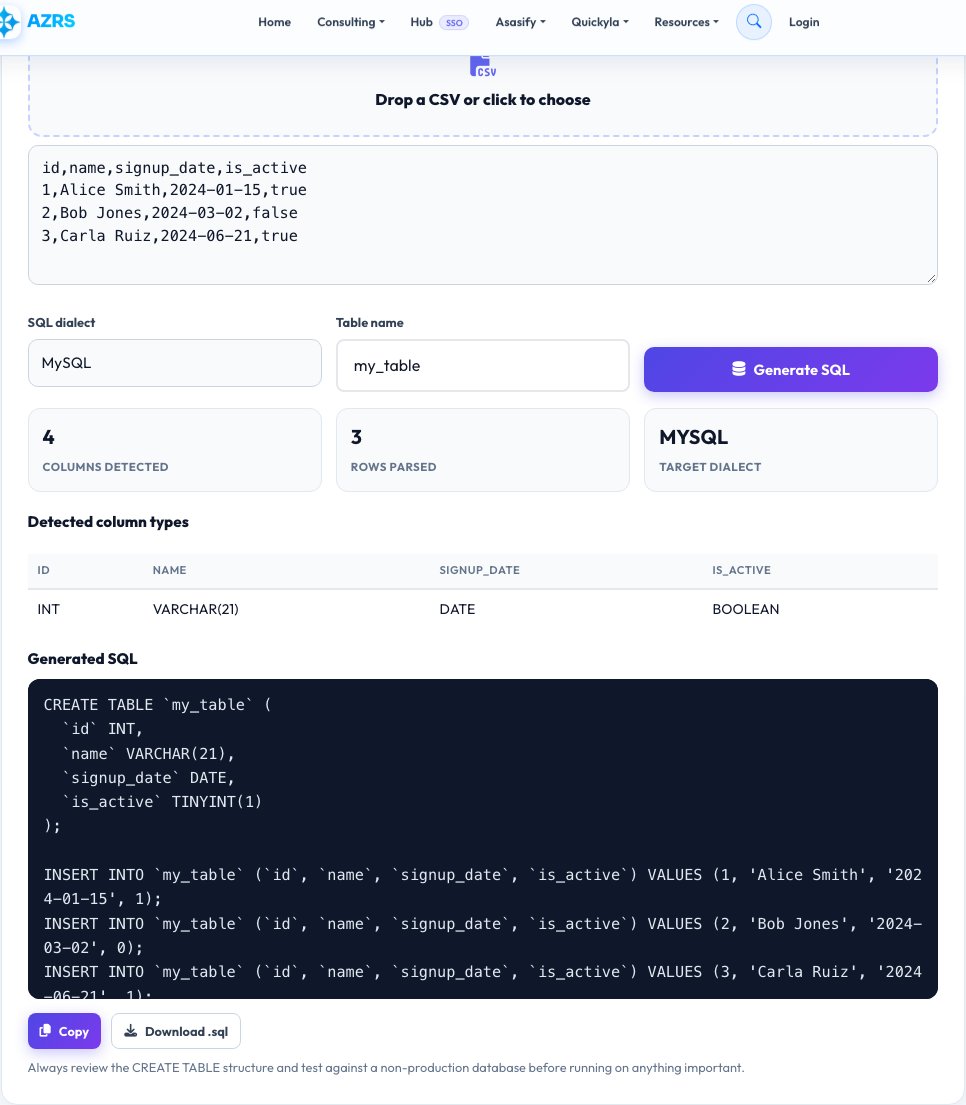
Upload your CSV file.
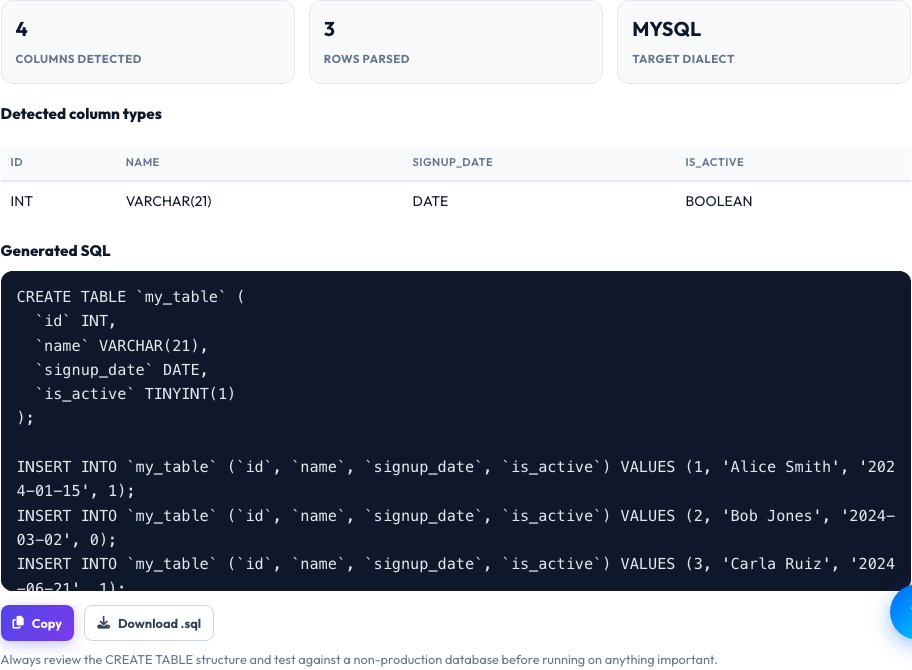 Download it
Choose your target SQL dialect (MySQL, PostgreSQL or SQLite) and a table name.
CSV to SQL INSERT Generator
Turning a spreadsheet export into database-ready SQL by hand means manually typing INSERT statements, escaping quotes and guessing at data types — tedious and error-prone for anything beyond a few rows. This tool parses your real uploaded CSV (correctly handling quoted fields, commas inside quotes, and different line endings), inspects each column's actual real values across every row to detect whether it's really an integer, a decimal, a date, a boolean or text, and generates genuine, properly escaped SQL INSERT statements from the real data.
Choose your target dialect — MySQL, PostgreSQL or SQLite — and the generated CREATE TABLE and INSERT statements use that dialect's real correct quoting and type names, so the output is ready to paste into a real database console and run, not a generic approximation.
Key features
Real CSV parsing
Correctly handles quoted fields, embedded commas and different line endings, not a naive comma-split.
Automatic real type detection
Inspects actual column values to detect integer, decimal, date, boolean or text types per column.
Three real SQL dialects
Generates MySQL, PostgreSQL or SQLite-correct CREATE TABLE and INSERT syntax.
Properly escaped output
Single quotes and special characters inside your real data are escaped correctly for valid SQL.
How to use it
- Upload your CSV file.
- Choose your target SQL dialect (MySQL, PostgreSQL or SQLite) and a table name.
- Review the auto-detected column types, adjusting any if needed.
- Copy or download the generated CREATE TABLE and INSERT statements.
Worked example
Example
A CSV with columns id, name, signup_date, is_active and 500 rows generates a CREATE TABLE statement with real matching types (INT, VARCHAR, DATE, BOOLEAN) detected from the actual data, followed by 500 correctly escaped INSERT INTO statements, ready to paste directly into a database console.
Who uses this tool
Developers importing spreadsheet data into a real database
Skip manually writing INSERT statements for every row.
Data analysts moving CSV exports into SQL for querying
Get a working table structure and real data in one step instead of two separate manual tasks.
Anyone migrating a small dataset between spreadsheet and database tools
Produce genuine, dialect-correct SQL instead of hand-editing a generic template.
Tips for the best results
- Always review the auto-detected column types before running the generated SQL on a real database — automatic detection is based on the real observed data but you know your intended schema best (for example, a numeric-looking ID you actually want stored as text).
- For very large CSVs, the generated SQL file can be large too — most database tools handle a large multi-statement SQL file fine, but very large imports are sometimes faster with a dedicated bulk-load tool instead of individual INSERT statements.
- Column names with spaces or special characters are automatically quoted correctly for your chosen dialect, but renaming them to simple, safe identifiers before generating is still good practice for long-term database use.
Common mistakes to avoid
- Running the generated SQL against a live production database without reviewing it first — always test against a copy or staging database.
- Assuming automatic type detection is always exactly what you want — a column of numbers meant to be treated as text (like a ZIP code with leading zeros) may need a manual type override.
- Ignoring which SQL dialect you selected — MySQL, PostgreSQL and SQLite have real syntax differences (like quoting style and boolean handling) that matter for the statements to actually run correctly.
Why use AZRS QuickFix?
It is 100% free, needs no signup and has no watermark or usage limits. The tool runs in your browser, so what you type stays on your device, and it works on phones, tablets and desktops. New tools are added every week — bookmark this page or browse the full QuickFix toolbox.
Frequently asked questions
Does it detect column data types automatically?
Yes — it inspects every value in each real column across all rows and picks the most fitting real SQL type (integer, decimal, date, boolean or text) for that dialect, rather than defaulting everything to text.
Which SQL dialects are supported?
MySQL, PostgreSQL and SQLite, each with that dialect's own correct CREATE TABLE type names and quoting conventions.
Does it handle commas inside a quoted CSV field correctly?
Yes — it uses a real CSV parser that correctly handles quoted fields (including embedded commas and escaped quotes), not a naive split on every comma.
Is the generated SQL safe to run directly?
The values are properly escaped for valid SQL syntax, but always review the generated CREATE TABLE structure and test against a non-production database first, since only you know your intended real schema and constraints.
Is my CSV uploaded to a server?
No, parsing and SQL generation both happen entirely in your browser.
Is my data stored?
No, nothing is saved after you leave the page.