File Hash & Checksum Verifier
Compute a file's real SHA-256, SHA-1 and MD5 checksum in your browser and compare it to an expected hash · free, no signup
See File Hash & Checksum Verifier in action
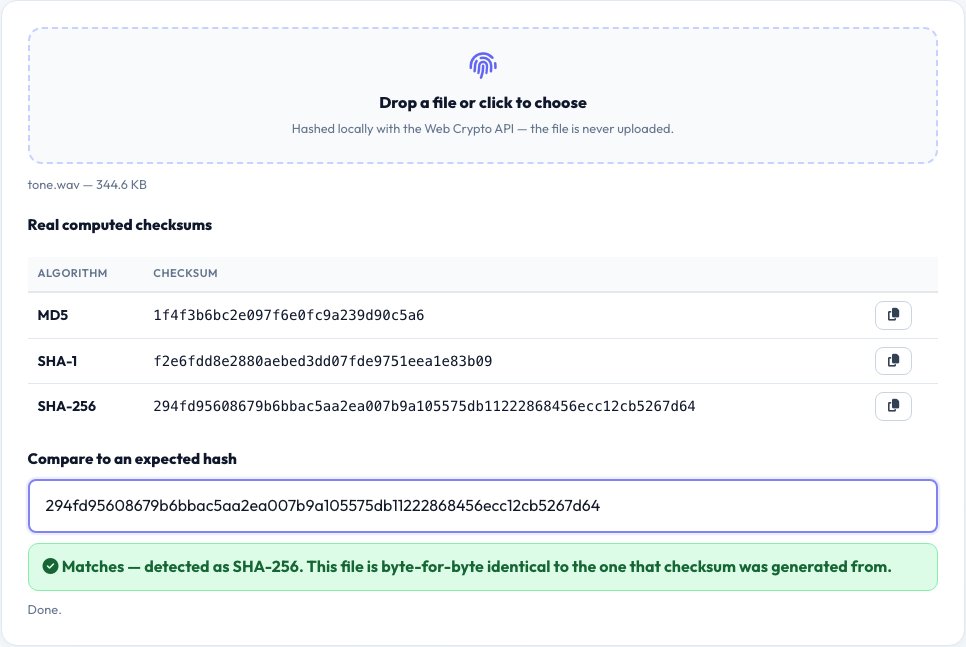
File Hash & Checksum Verifier
Software downloads, ISOs, firmware images and archives are often published with a checksum so you can confirm the file you received is exactly the one the publisher built — not corrupted in transit and not tampered with. This tool computes the real SHA-256, SHA-1 and MD5 hash of any file you drop in, using the browser's native Web Crypto API for SHA-256/SHA-1 and a from-scratch, test-vector-verified implementation of MD5 (which browsers don't expose natively), entirely on your device.
Paste the checksum the publisher listed into the 'expected hash' field and the tool automatically detects which algorithm it is by length (32 hex characters = MD5, 40 = SHA-1, 64 = SHA-256) and tells you in plain terms whether it matches — no manual copy-paste comparison of long hex strings by eye.
Key features
Three real algorithms at once
SHA-256, SHA-1 and MD5 computed together from the same file, no need to guess which one a publisher used.
Auto-matching against an expected hash
Paste a published checksum and the tool detects the algorithm by length and flags a real match or mismatch.
Runs entirely offline
The file is read and hashed with the Web Crypto API in your browser; nothing is uploaded anywhere.
Works on any file, any size your browser can hold in memory
Software installers, ISOs, archives, documents — anything with a published checksum.
How to use it
- Drop the downloaded file onto the tool, or click to choose it.
- Wait a moment while your browser computes the real SHA-256, SHA-1 and MD5 hash.
- Paste the checksum the publisher listed next to the download.
- See an instant, real match or mismatch — a mismatch means the file is corrupted or was tampered with; do not run it.
Worked example
Example
A 400 MB Linux ISO with a published SHA-256 of 9f86d0... → this tool computes the file's real SHA-256 locally and shows a green 'Matches' badge the moment the two 64-character hex strings are identical, or a red 'Does NOT match — do not use this file' warning if even one character differs.
Who uses this tool
Anyone downloading an OS image or installer
Confirm the file wasn't corrupted mid-download or swapped by a compromised mirror before running it.
Developers verifying a build artifact
Confirm a CI-built file matches the checksum recorded at build time.
Anyone who received a file from an untrusted source
Compare it against a checksum obtained through a separate, trusted channel to catch tampering.
Tips for the best results
- Get the expected checksum from the publisher's official site or release notes, not from the same untrusted source as the file itself, or the comparison proves nothing.
- A SHA-256 match is a much stronger integrity guarantee than an MD5 match — MD5 and SHA-1 are still offered here because many older published checksums use them, but prefer SHA-256 when a publisher offers a choice.
- Large files can take a few seconds to hash since everything happens on your CPU in the browser — this is expected and doesn't mean anything is wrong.
Common mistakes to avoid
- Comparing only the first and last few characters of a long hash by eye instead of using the tool's automatic full-string comparison.
- Trusting a checksum that was published on the exact same page as a tampered download link — get it from a second, independent source when integrity really matters.
- Assuming a filename match or a 'file looks fine' is the same as a verified checksum match — only a matching hash proves byte-for-byte integrity.
Why use AZRS QuickFix?
It is 100% free, needs no signup and has no watermark or usage limits. The tool runs in your browser, so what you type stays on your device, and it works on phones, tablets and desktops. New tools are added every week — bookmark this page or browse the full QuickFix toolbox.
Frequently asked questions
Why does the file's hash matter?
A cryptographic hash is a fixed-length fingerprint of a file's exact bytes — if even one bit changes (from corruption, a bad download or tampering), the entire hash comes out completely different, so a match is strong evidence the file you have is identical to the one the publisher hashed.
Which algorithm should I trust most?
SHA-256 is the modern standard and by far the strongest of the three offered here. MD5 and SHA-1 are both considered cryptographically broken for security purposes (though still fine for accidental-corruption checks) and are included mainly because many older published checksums still use them.
Is the file uploaded anywhere to compute the hash?
No — the file is read and hashed entirely in your browser using the Web Crypto API (for SHA-256/SHA-1) and a local JavaScript MD5 implementation; it never leaves your device.
What does a mismatch mean?
The file you have is not byte-for-byte identical to the one the checksum was generated from — it could be a partial/corrupted download, a different version, or in rare cases a tampered file. Re-download from the official source rather than running it.
Can this hash a very large file?
Yes, up to whatever your browser can hold in memory to read the file — very large files (multiple gigabytes) may take longer and use more memory.
Is my data stored?
No, nothing is uploaded or saved — the hash is computed and shown to you locally.