G-code Print Time & Filament Cost Estimator
Accurate print time with acceleration, plus filament, power and business cost · free, no signup
See G-code Print Time & Filament Cost Estimator in action
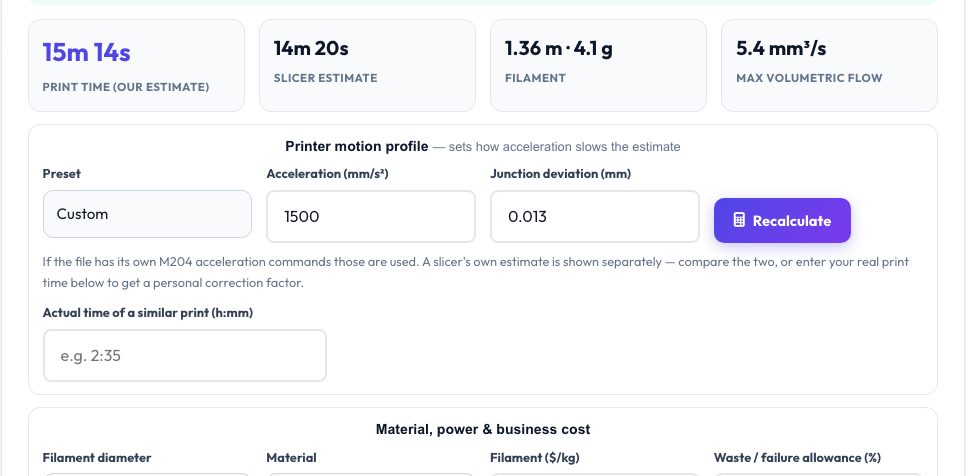
Free G-code Print Time & Cost Estimator
Most G-code time estimators simply divide distance by feed rate, which is far too optimistic because a printer constantly accelerates and brakes. This tool runs a Marlin-style look-ahead planner over every move: it computes junction speeds from the corner angle (junction deviation), applies your acceleration, and integrates the real trapezoidal speed profile of each segment. Choose a preset for your printer class or enter your acceleration, and the estimate lands much closer to the real clock.
Enter the actual time of a similar print once and it computes a personal correction factor, saved in your browser for next time. From the same file you get exact filament length and weight, volumetric flow statistics, and a full cost breakdown: filament, electricity (watts × hours × price), machine wear, labour, a failure allowance and a suggested sale price with markup.
Key features
Acceleration-aware time
Junction-deviation planner with your acceleration — not a naive distance ÷ speed.
Slicer comparison & calibration
See the slicer's own estimate and derive a correction factor from a real print.
Real filament numbers
Length, weight and cost computed from every extrusion move.
Full business cost
Electricity, machine hours, labour, waste and markup in one table.
How to use it
- Drop in your .gcode file.
- Pick a printer preset or enter acceleration and junction deviation.
- Set filament price, power draw and any labour or markup.
- Read the time, filament and cost breakdown.
Worked example
Example
A 3 h 10 m print on a 5000 mm/s² printer that a slicer predicts at 3 h 02 m comes out at 3 h 08 m with the Prusa MK4 preset; with 62 g of PLA at $22/kg, 120 W at $0.15/kWh and a 40% markup the sale price lands near $9.20.
Who uses this tool
Print-on-demand sellers
Quote jobs from the actual G-code.
Print farms
Plan machine time and electricity.
Hobbyists
Know if a print will finish overnight.
Tips for the best results
- Match acceleration to what your firmware actually uses — M204 commands inside the file take priority.
- Calibrate once with a real print; the factor captures your printer's quirks.
- Heating and homing time are not included in the move time; add a few minutes.
- Use average, not peak, printer power for electricity (hotend and bed cycle on and off).
Common mistakes to avoid
- Using a slicer estimate that ignores acceleration limits.
- Forgetting the failure allowance when pricing prints.
- Entering peak wattage instead of average.
Why use AZRS QuickFix?
It is 100% free, needs no signup and has no watermark or usage limits. The tool runs in your browser, so what you type stays on your device, and it works on phones, tablets and desktops. New tools are added every week — bookmark this page or browse the full QuickFix toolbox.
Frequently asked questions
How does it estimate time?
A look-ahead planner: junction speeds from corner angles and a trapezoidal profile per segment using your acceleration.
Why differ from my slicer?
Slicers model acceleration/jerk and sometimes your printer's real limits more precisely; use the calibration to align them.
Does it include heating time?
No — only motion and dwell times in the file.
Is my G-code uploaded?
No — parsing runs in a background thread in your browser.