Onshape FeatureScript Snippet Library & Cheat Sheet
Copy-paste FeatureScript snippets: parameters, sketches, booleans, patterns, queries · free, no signup
FeatureScript NNNN; line and the import(...) version that Onshape generates in a new Feature Studio, and check Onshape's FeatureScript documentation (cad.onshape.com/FsDoc) for exact parameter names in your version.See Onshape FeatureScript Snippet Library & Cheat Sheet in action
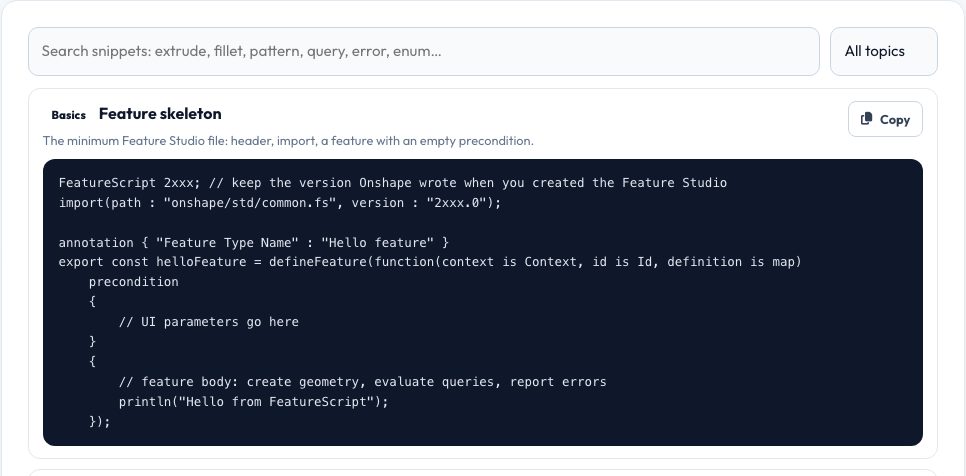
Onshape FeatureScript Snippet Library & Cheat Sheet
FeatureScript is Onshape's language for writing your own parametric features. The documentation is complete but dense; what students and makers need is a short list of patterns that work. This library collects them: the minimal feature skeleton, dialog parameters (lengths, angles, counts, booleans, selections with filters, enums with conditional fields), creating geometry from a sketch with extrude, filleting, boolean operations, linear patterns built with a loop, moving and deleting bodies, query functions and set operations, looping over selections and measuring, validation and error messages, units and arrays, and debugging helpers.
Search by keyword or filter by topic, then copy a snippet with one click. A reference table lists the common bounds constants, entity and geometry types and units. Remember that FeatureScript and its standard library are versioned: keep the version lines Onshape generates in your Feature Studio and check the official FsDoc for exact option names.
Key features
Working patterns
Skeletons, parameters, sketch+extrude, fillet, boolean, patterns, queries, errors.
Searchable
Filter by keyword or topic and copy with one click.
Reference tables
Bounds, units, entity and geometry types.
Beginner workflow
How to create a Feature Studio and iterate.
How to use it
- Search or pick a topic.
- Copy the snippet.
- Paste it into a Feature Studio in Onshape.
- Adjust names and units, then test in a Part Studio.
Worked example
Example
To pattern a body: copy the 'Linear pattern with a loop' snippet, paste it into your feature body after the extrude, and change definition.count and definition.spacing parameters in the precondition.
Who uses this tool
Onshape students
Learn FeatureScript from short, correct examples.
Makers and engineers
Automate repeated modelling tasks.
Educators
Hand out a one-page reference.
Tips for the best results
- Keep the version lines Onshape writes; do not edit them casually.
- Use println and debug while developing.
- Validate inputs and throw regenError with the parameter name for clear messages.
- Name ids clearly (id + "extrude1") so queries are stable.
Common mistakes to avoid
- Mixing units (adding a number to a length).
- Using queries before the operation that creates them.
- Forgetting to import the standard library.
Why use AZRS QuickFix?
It is 100% free, needs no signup and has no watermark or usage limits. The tool runs in your browser, so what you type stays on your device, and it works on phones, tablets and desktops. New tools are added every week — bookmark this page or browse the full QuickFix toolbox.
Frequently asked questions
What is FeatureScript?
A functional scripting language inside Onshape for creating custom parametric features and tools.
Where do I write it?
In a Feature Studio tab in your document.
Are these snippets version-specific?
They follow the standard library's common patterns; check the FsDoc for your version's exact parameters.
Is this an official Onshape resource?
No — it is an independent student-friendly cheat sheet.