Laser Cutting Cost & Time Estimator (SVG/DXF)
Upload SVG/DXF to measure cut length and pierces; get time, material and price · free, no signup
See Laser Cutting Cost & Time Estimator (SVG/DXF) in action
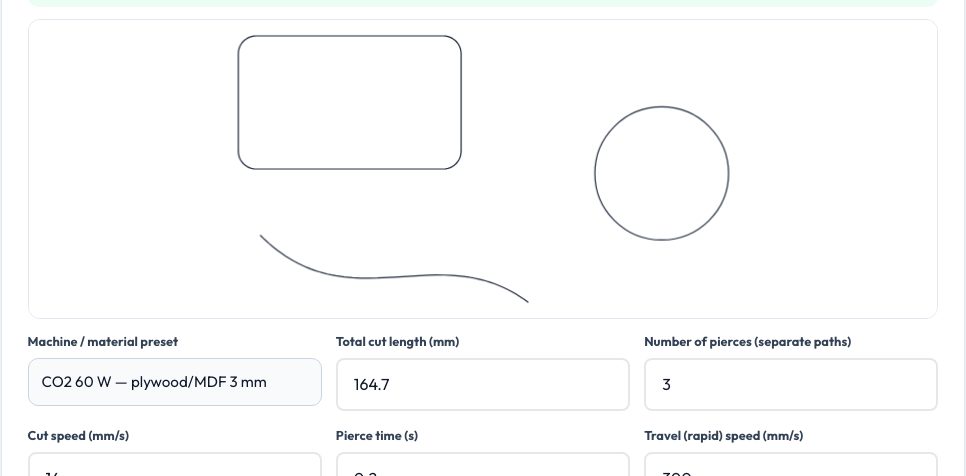
Free Laser Cutting Cost & Time Estimator
Laser cutting is priced mostly by time, and time is mostly cut length: the distance the beam travels along every contour, plus a pierce for each separate path and rapid moves between them. Drop in your SVG or DXF and this tool measures the exact cut length (circles, arcs and curves included), counts the separate paths (pierces), reads the bounding size and estimates the rapid travel with a nearest-neighbour path order. Without a file, enter the numbers by hand.
Pick a machine and material preset — CO₂ 60/100 W on plywood, MDF, acrylic, cardboard and leather, or fiber 1–3 kW on mild steel, stainless and aluminium — and the typical cut speed, pierce time and sheet price are filled in (all editable; use your own cut chart for real quotes). Add raster engraving area, nesting utilisation, quantity, machine rate, handling, setup, overhead and margin to get cutting, piercing, travel and engraving time, material per part, the cost breakdown and the price per part and for the job.
Key features
Automatic cut length & pierces
Measured from your SVG/DXF with curve-accurate geometry.
CO₂ and fiber presets
Typical speeds, pierce times and sheet prices — editable.
Time and cost breakdown
Cutting, piercing, travel, engraving, material, machine, setup and margin.
Private
Files are measured in your browser, never uploaded.
How to use it
- Drop in your SVG or DXF (optional).
- Choose the machine and material preset and adjust speed.
- Set quantity, sheet price, utilisation and rates.
- Read the time per part and the job price.
Worked example
Example
300 mm of cut path with 12 pierces on a 100 × 100 mm part in 3 mm plywood on a 60 W CO₂ laser (14 mm/s): about 25 s per part; at a $40/h machine rate, 65% sheet utilisation, $15 job setup and a 30% margin the price comes to about $2.00 per part for 20 pieces.
Who uses this tool
Makerspaces and small laser shops
Quote jobs from the actual design file.
Etsy and product makers
Know the cost of each cut part.
Students
Learn what drives laser cutting cost.
Tips for the best results
- Reduce pierces by joining contours or using common-line cutting.
- Nest tightly — material is often the biggest cost for steel.
- Engrave at the lowest quality that is acceptable; raster time grows with area.
- Use your machine's real cut chart instead of the presets for quotes.
Common mistakes to avoid
- Counting only cut length and forgetting pierce time on thick metal.
- Ignoring kerf in tight-fitting parts.
- Using one speed for all materials and thicknesses.
Why use AZRS QuickFix?
It is 100% free, needs no signup and has no watermark or usage limits. The tool runs in your browser, so what you type stays on your device, and it works on phones, tablets and desktops. New tools are added every week — bookmark this page or browse the full QuickFix toolbox.
Frequently asked questions
How is cut length measured?
Exact sum of all path lengths in the file, with curves flattened finely.
What are pierces?
Each separate closed or open path requires the beam to start with a piercing hole.
How accurate are the preset speeds?
They are typical values; edit them to match your machine and cut chart.
Is my design uploaded?
No — it is measured in your browser.