DXF to STL Extruder — 3D Print from a DXF Drawing
Extrude closed outlines in a DXF into a watertight STL with holes, scale and optional base plate · free, no signup
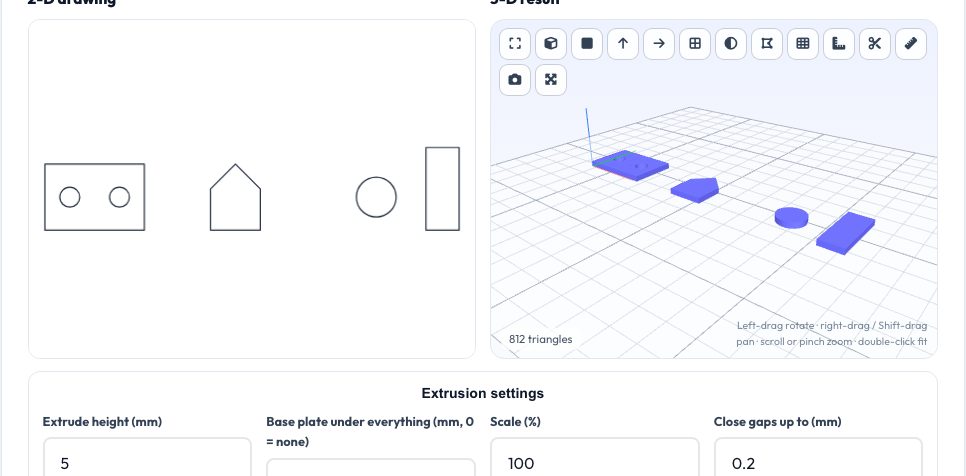
See DXF to STL Extruder — 3D Print from a DXF Drawing in action
Free DXF to STL Extruder
You have a DXF — a bracket outline, a logo, a floor plan, a laser-cut template — and want it as a 3D printable model. This converter reads the DXF (lines, arcs, circles, polylines, splines, ellipses and blocks), joins loose segments into closed outlines, treats nested outlines as holes, triangulates each region and extrudes it to the height you set.
Add a base plate to make signs and plaques from separate shapes, change scale or units, mirror the drawing and centre it on the bed. The result is a watertight solid you can download as STL, 3MF or OBJ. The file is processed locally and never uploaded.
Key features
Automatic hole detection
Outlines inside outlines become holes.
Gap closing
Joins broken line segments up to your tolerance.
Base plate option
Make plaques from many shapes.
Units & scale
Auto unit detection, scale percent, mirroring.
How to use it
- Drop in a DXF.
- Set height, scale and unit.
- Adjust gap tolerance if outlines are open.
- Download the STL.
Worked example
Example
A 100 × 60 mm rectangle with two circular holes extruded to 5 mm gives a plate of 30 cm³ minus the holes, ready to print.
Who uses this tool
Makers
Turn laser templates into printed parts.
CNC users
Check a profile in 3D.
Architects
Quick massing from plans.
Students
Visualise sketches.
Tips for the best results
- Close the outline before exporting from CAD.
- Explode text to curves first.
- Check units with the size in the stats.
- Use the base plate for loose shapes.
Common mistakes to avoid
- Open polylines which cannot be extruded.
- Drawings in inches interpreted as millimetres.
- Overlapping duplicate shapes.
Why use AZRS QuickFix?
It is 100% free, needs no signup and has no watermark or usage limits. The tool runs in your browser, so what you type stays on your device, and it works on phones, tablets and desktops. New tools are added every week — bookmark this page or browse the full QuickFix toolbox.
Frequently asked questions
Does it support 3D DXF?
Only 2-D geometry is extruded.
What about text?
Convert text to outlines first.
Can it handle splines?
Yes, they are flattened with tolerance.
Is my file uploaded?
No.